
Workflow automation
From Job Complete to Invoice Ready: A Field-Service Handoff That Holds Up
A completed visit can still leave billing waiting for the customer record, service detail, or approval. Define a small invoice-readiness check before connecting field operations to accounting.
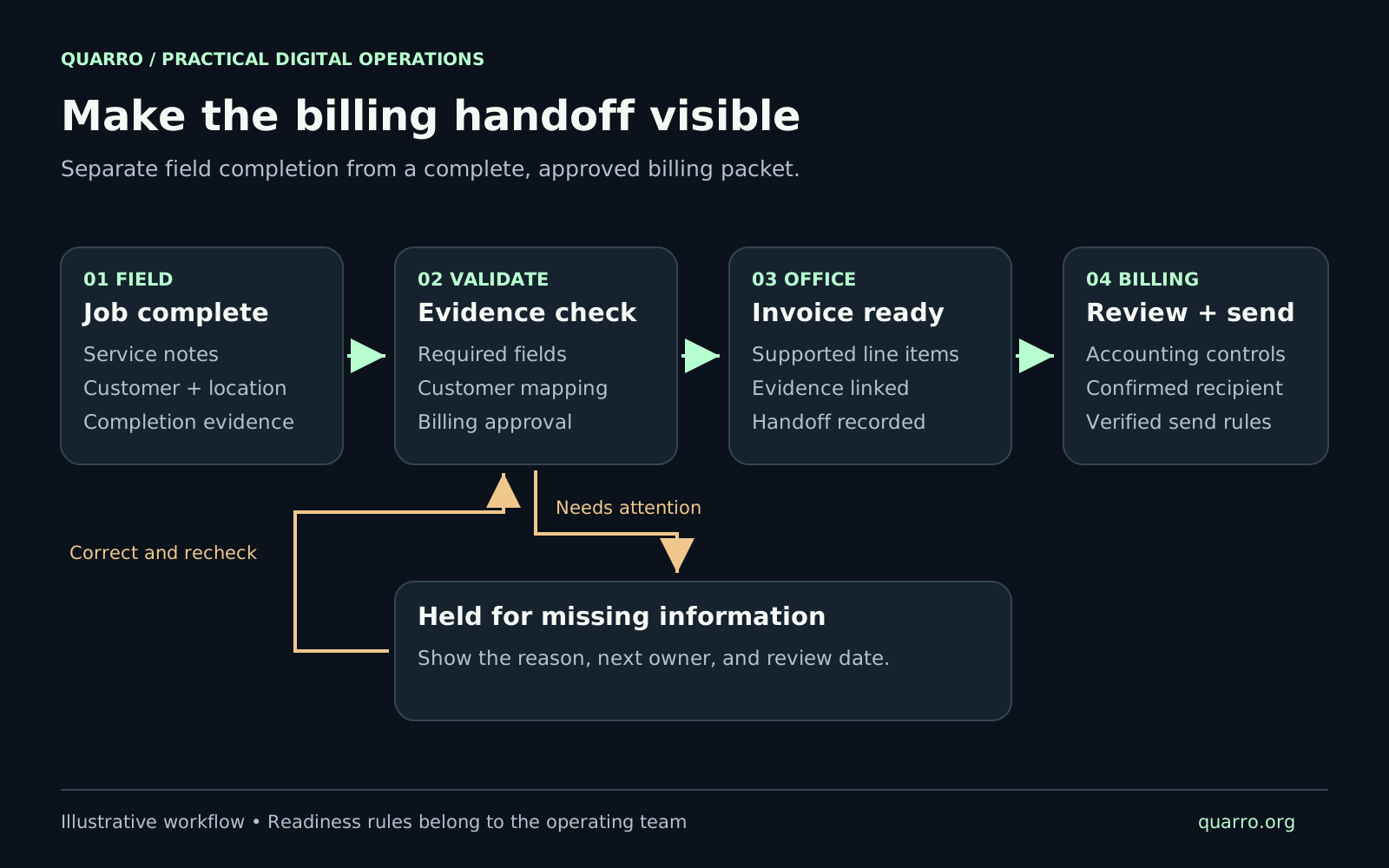
Give completion and billing readiness separate meanings
For an HVAC, plumbing, or maintenance team, a technician finishing the visit is one event. Having a complete, approved billing packet is another. A useful workflow records both. That distinction lets operations close the field task without hiding the work still waiting in the office. Start by defining the output: an invoice-ready job has an identified bill-to customer, the correct service location, an agreed description of the work, supported quantities, and the approvals required by the business. The exact checklist varies by service and customer. A routine maintenance visit may need fewer checks than a repair performed under a commercial purchase order. This is a workflow design guide, not an accounting policy. The person responsible for billing should decide the charge, tax treatment, and payment terms before those rules become software.
Build one small handoff record
Keep a durable job identifier from scheduling through billing. Connect it to the relevant customer and location records, then capture the evidence needed to explain what happened: completion time, work performed, parts or labor details where applicable, and any required customer acknowledgment. Avoid turning this into an enormous form. Each required field should answer a billing or operational question. If a photograph is required only for a particular job type, show that requirement when that type is selected. If the technician cannot know a customer's purchase-order number, route the missing information to the office instead of demanding a guess. A practical record also identifies who submitted it and when it last changed. Billing staff should be able to find the underlying service notes without searching a separate inbox. Store links to approved evidence rather than copying unnecessary customer information into every tool.
Make exceptions visible and assignable
Consider a hypothetical maintenance visit where the technician has completed the work, but the customer's purchase-order reference is missing. The job should enter a clearly labeled billing hold. The hold should show the missing item, the person responsible for obtaining it, and the next review date. Use a few explicit reasons, such as missing service detail, customer mismatch, unapproved charge, or missing purchase order. Leave room for a short explanation. A generic red status forces the next person to investigate the same issue again. When the missing detail arrives, recheck the entire billing packet. The record might have changed while it was waiting. Clearing one warning should not silently override a different unresolved issue. The office needs a visible path back to the technician when the service description itself needs correction.
Connect accounting only after identity is clear
An integration should use the accounting system's customer identifier, not assume that a matching display name proves two records belong together. A property manager can have several locations, and the service address may differ from the bill-to entity. Review uncertain matches before creating transactions. Intuit's QuickBooks Online Invoice API reference requires a customer reference and at least one qualifying line. Its billing implementation guidance also describes referencing existing entity IDs when creating transactions. Those technical requirements support a broader design point: prepare and validate the customer and line-item mappings before sending a job into accounting. Keep invoice creation, accounting review, and customer delivery distinguishable in the integration design. Verify the actual sending behavior of the connected system in a test environment. A workflow should never rely on an assumed draft state to protect a customer from receiving an unfinished bill.
Pilot the handoff with real variations
Choose a bounded set of job types and ask both a field user and a billing user to walk through them. Include a normal completion, a missing customer reference, an incomplete service note, and a job that is corrected after submission. Use synthetic or appropriately protected test records. For each case, ask four questions. Can the technician finish their part without guessing? Can billing explain why the job is ready or held? Is the next owner obvious? Can a correction reach the right record without producing a second billing packet? Keep the first version narrow enough to inspect. A form, a status view, and a small integration can be sufficient if they solve the handoff. More automation becomes useful once the team agrees on the rules and can recognize an exception.
Measure waiting time and the reasons behind it
Track the time from field completion to invoice readiness separately from the time to invoice creation. These measures answer different questions. A delay before readiness suggests an information or approval problem; a delay after readiness suggests a billing queue or integration issue. Review the age of held jobs, the share returned for correction, and the most frequent hold reasons. Agree on the start and end timestamps before comparing periods. Record an actual baseline rather than promising a percentage improvement in advance. The first useful deliverable is a shared definition of ready, a short checklist, and a queue that exposes who needs to act. Quarro's workflow automation and integration work can connect that handoff to the tools a team already uses. Begin with one service category and make its path to billing understandable end to end.