
Ecommerce Operations
How to Validate Ecommerce Catalog and Price Updates Before Release
A catalog update deserves a clear record of what will change. Compare the intended data with the current store, resolve identity and field rules, and verify the result after release.
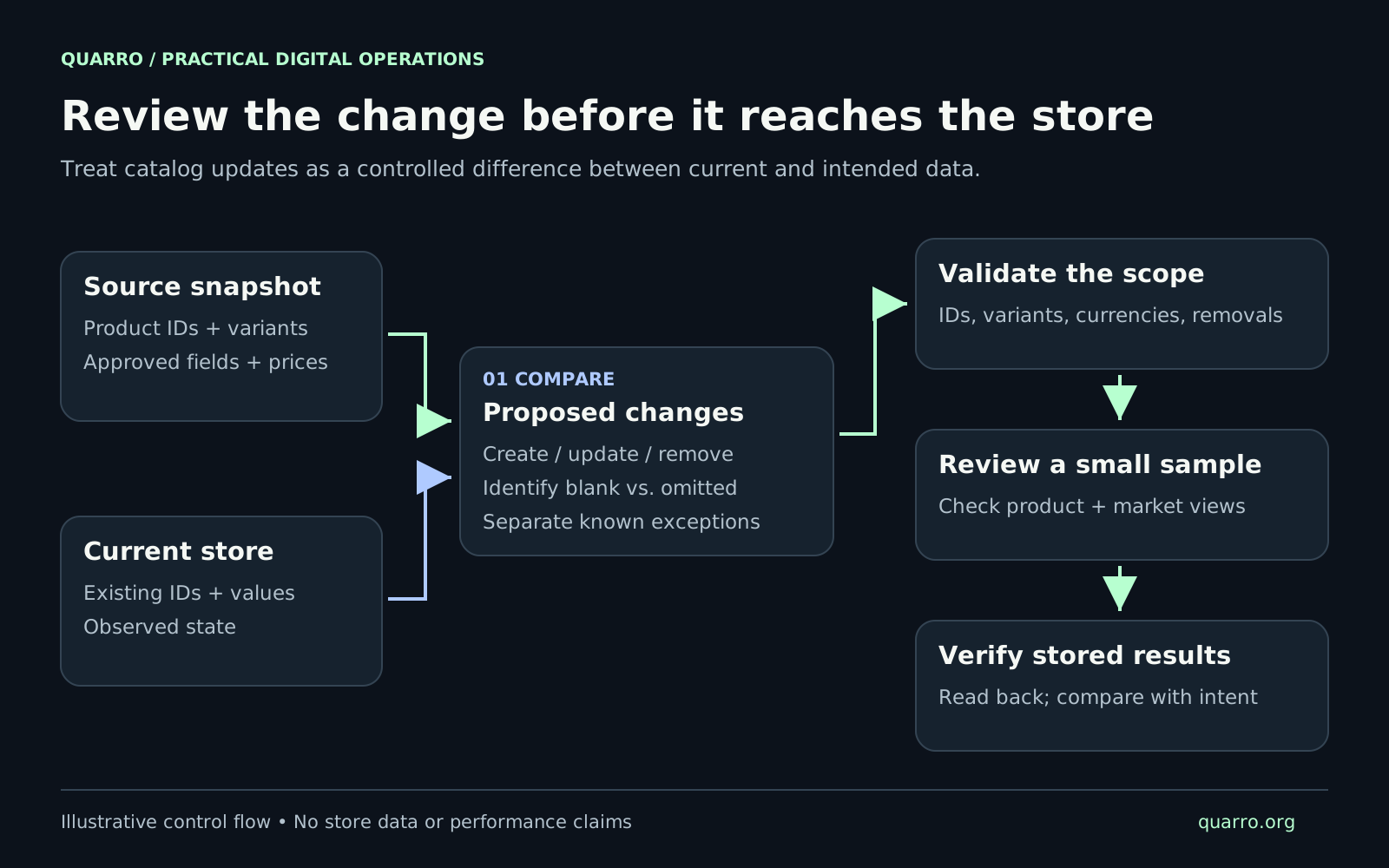
Start with a proposed change set
Imagine a fictional home-goods retailer receiving a supplier file with revised prices, renamed finishes, and several missing products. The team wants to publish the approved prices while preserving its own descriptions. A direct import would leave important questions unanswered: does a missing item mean discontinued, and does a blank description mean remove the current copy? At Quarro, we would begin with two dated snapshots: the approved source data and the store's current values. Generate a proposed change set between them. Each entry should identify the target record, affected field, existing value, intended value, and reason for the change. Separate creations, updates, removals, and unresolved matches so a reviewer can inspect the actual scope.
Define who owns each field
Agree which system may change each field before building the mapping. A supplier might own a manufacturer reference while the retailer owns merchandising copy. Pricing may come from an approved internal schedule. Record these choices explicitly, including who can approve exceptions. Limit each run to its authorized fields. For a price-only release, unexpected description edits should become exceptions requiring review. Also define the market, currency, effective date, and treatment of promotions. Two identical numeric prices can represent different intentions when their currencies or market scopes differ. Preserve the source version used to calculate the changes. If somebody replaces the supplier file during review, create a fresh proposal rather than silently changing the contents of the approved one.
Resolve the exact product and variant
Keep a maintained mapping between source identifiers and destination product and variant identifiers. Check that each incoming record resolves to the intended sellable item. Flag missing matches, duplicate mappings, and unexpected option combinations before release. Do not assume that a name or an unvalidated SKU is a sufficient identity key. Shopify's product CSV guide warns that changing option-value columns deletes existing variant IDs and creates new ones, which can break dependencies. That documented behavior makes an option rename a change worth reviewing separately from a price adjustment. For our fictional retailer, “Walnut” becoming “Dark Walnut” should trigger an identity review. The reviewer needs to determine whether this is a label correction or a different item. The integration should preserve that decision and test any affected downstream references.
Give blank, omitted, and removed different instructions
Use explicit operations in the internal change proposal: set a value, clear a value, leave it unchanged, or request removal. Convert those operations into the destination's supported format only after validation. Shopify's CSV documentation gives a concrete example: when overwriting matching products, a blank non-required column clears its matching value, while an omitted non-required column generally preserves it. The guide also describes dependencies between columns, so omission rules require field-specific checks. For the hypothetical price release, an empty supplier description should therefore enter review unless the agreed mapping clearly says to preserve it. A missing product should remain an unresolved absence until the source's completeness and removal policy are established. Never infer a deletion from a partial export. Keep removals in their own review group with the reason and affected destinations visible.
Validate the batch and choose a useful test sample
Check required identities, permitted fields, numeric formats, currencies, duplicate targets, and the expected number of changes. Define review thresholds with the person responsible for pricing. An unusually large price movement or an unexpected increase in removals should pause the affected work for explanation. Choose tests by behavior, rather than inspecting only the first few rows. Include a multi-variant product, a market-specific price, an intentional clear, an unchanged record, an unresolved identifier, and a record that should be rejected. Use a safe test environment where available, then review a deliberately limited release before expanding. Write the expected result for each case first. For a price change, specify the exact variant, intended stored amount, market, and storefront view to inspect. These expectations give the reviewer something concrete to compare.
Record partial outcomes and read the values back
Shopify's productVariantsBulkUpdate documentation exposes an allowPartialUpdates option. With partial updates enabled, valid variant changes may persist while invalid ones fail; the documented default is false. An integration should make its chosen setting visible and retain the returned error details. Track each intended change through submitted, rejected, verified, or unresolved outcomes. When a result is unclear, inspect the destination before repeating the write. A retry should start from the verified state and the remaining approved changes. After release, retrieve the affected records and compare their stored values with the proposal. Check the relevant customer-facing product and market views as a separate step. Save discrepancies with the source record, destination identifier, expected value, observed value, and next owner. Define when to stop subsequent batches and who may authorize a correction.
Keep the review usable after the release
Retain the approved proposal, source snapshot, before-values, run identifier, outcomes, and verification evidence together. A recovery plan should explain which changes can safely be reversed and how to handle later edits that must be preserved. Restoring an old snapshot wholesale could overwrite legitimate work performed after the release. The practical deliverable is a catalog update someone can explain: these items were selected, these fields were authorized, these exceptions were held, and these resulting values were checked. That record gives the next operator a clear place to begin when a customer, merchandiser, or supplier raises a question.