
Data and reporting
CSV imports: build a dry run before changing business data
Design a CSV import workflow with staging, row-level errors, change previews and reconciliation before updating CRM, ERP or reporting data.
Why this workflow needs an operating contract
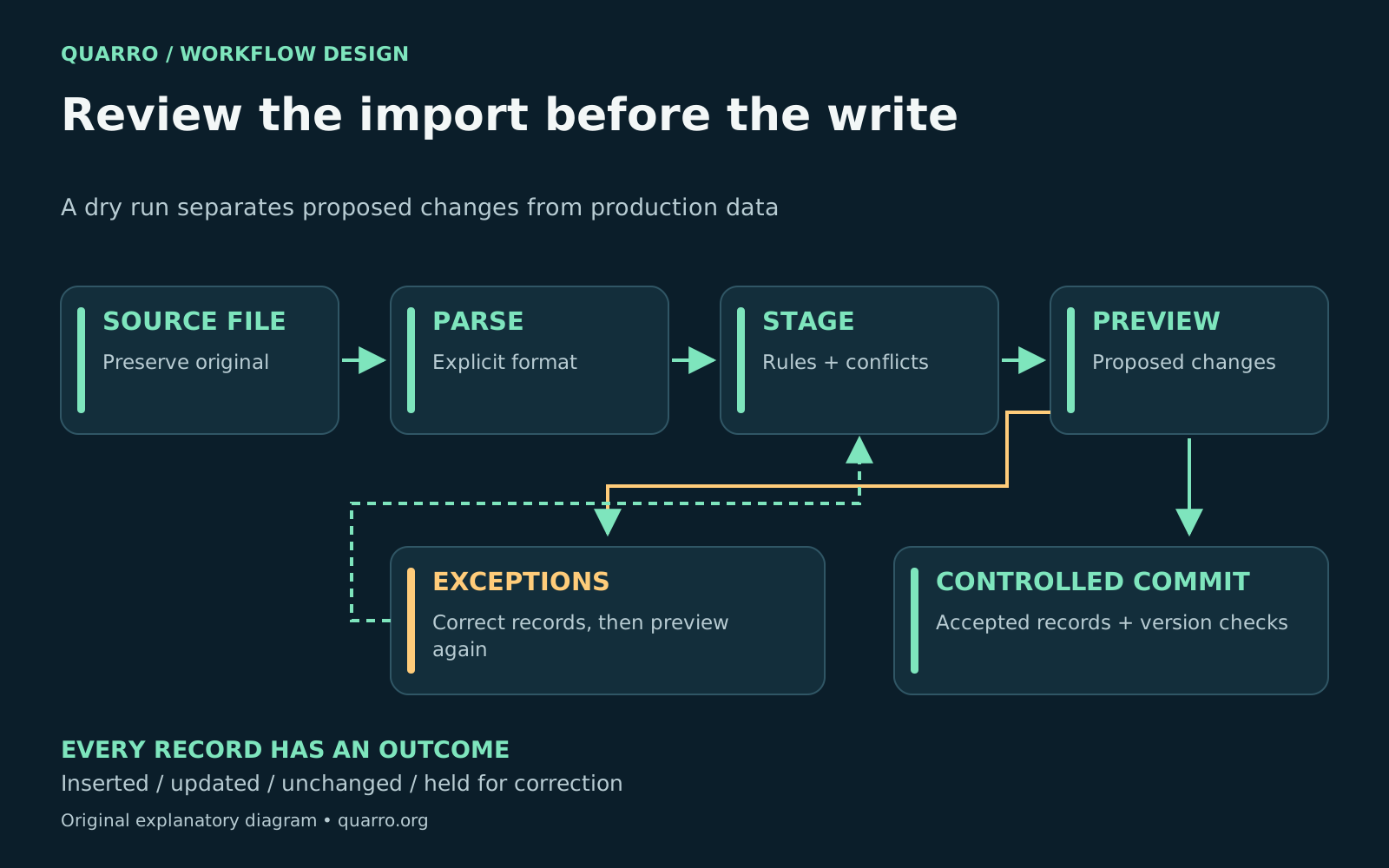
A reliable CSV import should show what will change before it changes production data. Preserve the original file, parse it with an explicit format, validate records in staging, and let an operator review inserts, updates and exceptions. After the write, reconcile the results against that reviewed plan. Consider an illustrative distributor moving a supplier catalog into an ERP. The file contains product codes, descriptions and prices. A successful upload says little about whether a code lost its leading zero, a blank price erased an existing value, or a duplicate record overwrote a newer one. Those are business decisions that a parser cannot make.
Agree on the import contract
Define the required headers, text encoding, delimiter, quoting convention and accepted date formats. For every column, specify its business meaning, whether it is required, and what an empty value means. Keep identifiers as text when leading zeros are significant. Record the currency and unit next to values that need them. A CSV record can contain a quoted comma or line break. Splitting a file on commas or physical lines therefore creates avoidable errors. <a href="https://www.rfc-editor.org/info/rfc4180/">RFC 4180</a> describes these conventions; <a href="https://docs.python.org/3/library/csv.html">Python’s CSV module</a> provides a reader with configurable dialects and recommends opening file objects with newline handling left to the module. Its default reader returns strings, so domain-specific type conversion still belongs in your import logic. Give the contract a version. If a supplier later renames a column or changes the meaning of a status, the importer should flag the change instead of silently guessing.
Stage records with enough context to repair them
Keep the raw upload separate from production tables. Assign the run an import ID and record a file fingerprint, contract version and upload timestamp. For each parsed record, retain its logical record number, source identifier, original values and proposed normalized values. A logical record number is more dependable for support than assuming that every record equals one line. - Structure checks: required headers, consistent record shape and parseable fields - Business checks: known product codes, accepted units, allowed statuses and relationships - Conflict checks: duplicate keys inside the file and collisions with existing records - Change checks: fields that would be added, replaced, cleared or left unchanged Write errors for the person who must fix them. “Price requires a decimal amount in USD” is actionable. “Validation failed” forces that person to rediscover the rule. Restrict access to error exports and avoid copying unnecessary personal data into logs.
Preview the actual merge policy
A useful dry run reports proposed inserts, updates, unchanged records and rejected records separately. Show a field-level before-and-after comparison for risky changes. Decide explicitly whether an empty field clears a value, preserves it, or blocks the record. Also decide which source wins when the same key appears twice. For a catalog, an operator may approve new descriptions while holding price changes for a separate reviewer. For customer records, the matching rule may require a verified internal ID rather than a name. Treat those rules as configuration that is reviewed with the business owner, not accidental behavior inherited from the database. PostgreSQL’s <a href="https://www.postgresql.org/docs/18/sql-copy.html">COPY documentation</a> illustrates the boundary. COPY FROM appends records, and HEADER MATCH can check header names and order. PostgreSQL 18 also supports discarding rows with certain input-conversion errors using ON_ERROR. That mechanism does not establish your duplicate, ownership or business-approval policy. Stage first when those decisions matter, and check the options available in your deployed database version.
Prevent the preview from going stale
A preview is a statement about a particular file and a particular state of the destination. Bind approval to the file fingerprint and validated import plan. At commit time, compare the destination record’s current version with the previewed version in the same conditional write or transaction. Hold those conflicts for another review rather than overwriting an intervening correction. Choose transaction boundaries intentionally. A small, tightly related import may need all-or-nothing behavior. A large catalog may use bounded batches, provided partial completion is visible and safely resumable. Preserve an import record that maps each attempted change to its final outcome.
Close the loop with reconciliation
- Confirm that every input record has an outcome, including intentionally skipped records - Compare reviewed changes with committed changes and investigate any difference - Test re-uploading the same file without creating duplicate business records - Test a corrected file without replaying changes that already succeeded - Document who handles rejected records and how production changes can be corrected Start with a representative sample containing difficult cases, including duplicate keys, blank fields, quoted line breaks and destination edits during review. This reveals more than a clean demonstration file. The result is a data-migration workflow an operator can explain, inspect and recover. For adjacent design choices, see <a href="https://quarro.org/blog/ecommerce-catalog-price-sync-validation/">catalog price-sync validation</a> and <a href="https://quarro.org/blog/spreadsheet-reporting-needs-stable-anchors/">stable anchors for spreadsheet reporting</a>. Data imports sit naturally alongside the custom software, integrations and reporting work described by <a href="https://quarro.org/">Quarro</a>.