
Workflow automation
Approval workflows: bind each decision to the version reviewed
Prevent stale approvals with version checks, explicit state transitions and a review trail that records exactly which business changes were approved.
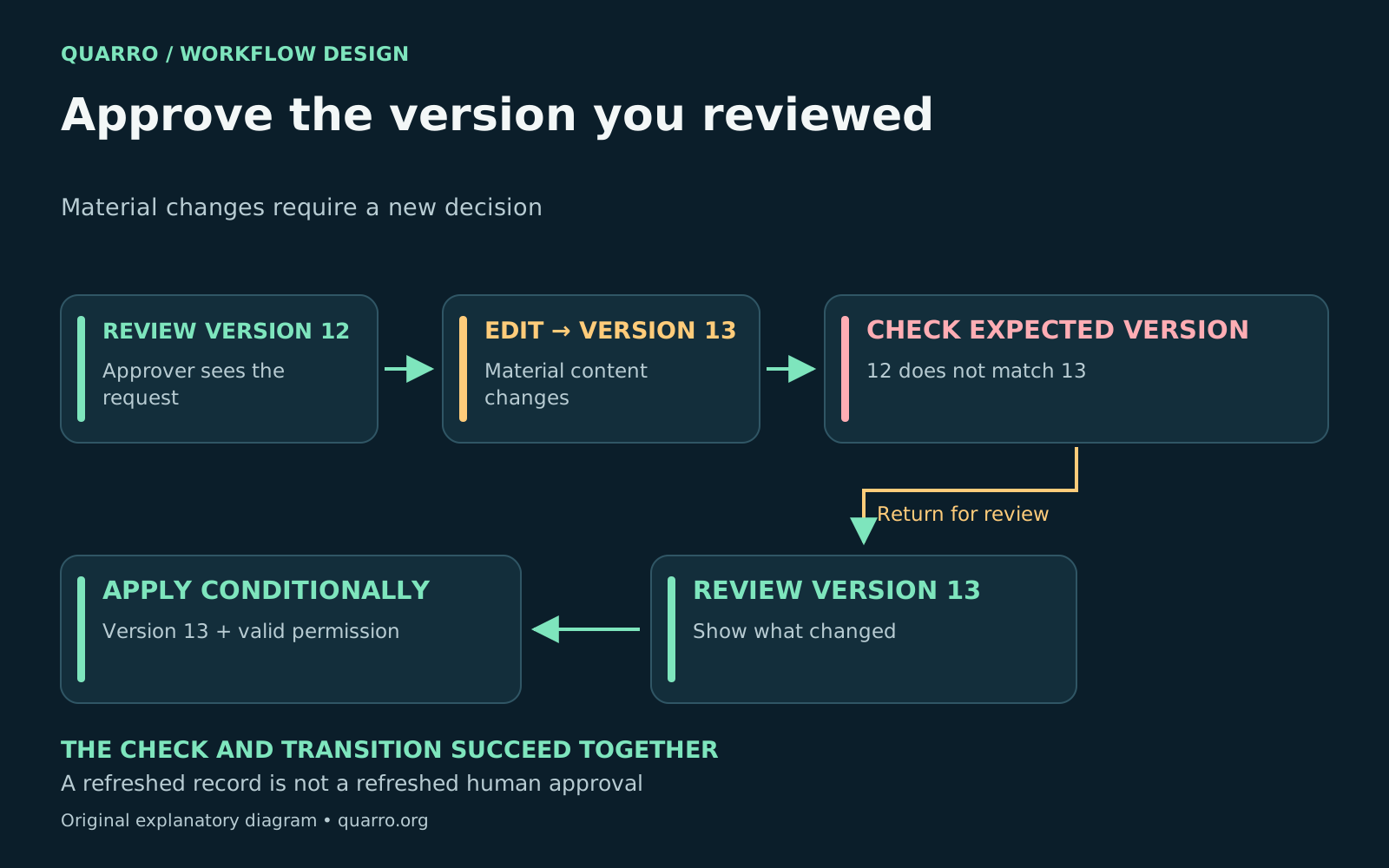
Why this workflow needs an operating contract
An approval workflow should apply a decision only to the record version the approver actually reviewed. Store that version with the decision, verify permission at action time, and make the transition conditional on the current record still matching. If material content changed, show the difference and request a fresh decision. Imagine a facilities manager reviewing a service request for one replacement part. While the approval screen remains open, another person changes the quantity and delivery location. If the application stores only an “approved” flag, the manager’s click can authorize a request they never saw. This is an illustrative design failure, not a reported customer incident.
What should an approval record contain?
Treat approval as a separate record tied to a stable business object. At minimum, preserve the request ID, reviewed version, decision, approver identity, timestamp and applicable policy version. Keep the reviewed content or an immutable reference to it so the record remains interpretable later. Define which edits invalidate a decision. An amount, recipient, scope or required document may be material; a spelling correction may not be. The process owner should make that distinction explicit. If the system uses a fingerprint of selected fields, document exactly which fields are covered and why excluded fields cannot alter the approved action.
Use an atomic version check at the transition
Reading the current version and then writing the approval in two unrelated operations leaves another window for a race. The comparison and state transition should succeed together or fail together. A database conditional update or transaction can enforce that rule. <a href="https://docs.aws.amazon.com/amazondynamodb/latest/developerguide/BestPractices_OptimisticLocking.html">Amazon DynamoDB’s optimistic-locking guidance</a> describes storing a version attribute and comparing it in a conditional write. An intervening update makes the condition fail. The technique detects write conflicts; your application still decides whether the user must review the new content. At an HTTP boundary, <a href="https://www.rfc-editor.org/rfc/rfc9110.html#section-13.1.1">RFC 9110’s If-Match precondition</a> provides a related mechanism using strong entity tags. The server evaluates the precondition before applying the method. A failed precondition generally produces a 412 response. Adding the header alone is insufficient if the application does not tie that comparison to its actual business-state update. Do not automatically refresh the version and replay a human approval after a conflict. That would attach the old decision to newly fetched content. Return a clear message, highlight the material differences, and preserve the attempted decision for troubleshooting without presenting it as an effective approval.
Separate permission, state and duplicate handling
Three questions need independent answers. Is this person allowed to approve now? Is the request in a state that can accept this decision? Has this same decision request already been processed? A version token cannot answer all three. - Permission: resolve the authenticated actor and current role on the server - State: allow only defined transitions, such as pending review to approved or rejected - Duplication: attach a request identifier so a repeated click can return the recorded outcome - Scope: require the expected version and the material fields or snapshot that were reviewed <a href="https://cheatsheetseries.owasp.org/cheatsheets/Authorization_Cheat_Sheet.html">OWASP’s authorization guidance</a> recommends checking permissions on every request. Apply that principle when an approval is submitted, even if the button was visible earlier. A person’s role or access may have changed since the page loaded.
Keep execution tied to the approved snapshot
Downstream work should reference the effective approval and its reviewed version. If another edit arrives between approval and execution, either execute an immutable approved specification or invalidate and re-review according to the policy. Reading whichever mutable values happen to exist later defeats the version check. For external actions, distinguish “approved,” “submitted” and “confirmed.” A timeout after submission is an uncertain execution result, not a reason to approve the request again or blindly duplicate the action. Record the external reference when available and reconcile the outcome through the destination system.
Test the awkward cases before rollout
- Two approvers act on the same version at nearly the same time - A material edit lands after the approval screen loads - An approver loses their role before submitting the decision - A user double-clicks or repeats a request after a timeout - A request is withdrawn, reopened or changed after approval - Execution encounters a newer version than the approved snapshot Success means each case produces a consistent business state and an explanation a support person can follow. Keep the error message practical: identify that the request changed, show what changed, and provide the route back to review. Version-aware approvals are one part of maintainable <a href="https://quarro.org/blog/custom-software-support-handoff/">custom-software handoff</a>. Stable identities also matter, as discussed in <a href="https://quarro.org/blog/crm-intake-routing-needs-identity-map/">CRM intake routing</a>. Together, these are useful building blocks for <a href="https://quarro.org/">Quarro’s workflow and digital-solutions focus</a>.